Most businesses don't have a productivity problem. They have a workflow problem.
As organizations grow, they naturally invest in better software, hire experienced talent, and introduce new processes to improve efficiency. Yet despite these investments, work often becomes slower instead of faster.
Projects wait for approvals. Sales teams update multiple systems with the same information. Finance chases missing data. Managers spend hours asking for status updates that should already be visible.
The issue isn't your people.
It's the manual work happening between your systems.
Executive Summary
Every growing business eventually reaches a point where operational complexity begins to outpace productivity. More software and more employees don't necessarily create faster execution; they often create more coordination.
In this article, we'll explore:
✓ Why manual work silently becomes one of the biggest operating costs
✓ Why hiring more people rarely solves fragmented workflows
✓ Which business processes should be automated first
✓ How leaders identify automation opportunities with the fastest ROI
The Hidden Cost of Manual Work
Your highest-paid employees shouldn't spend their day moving information.
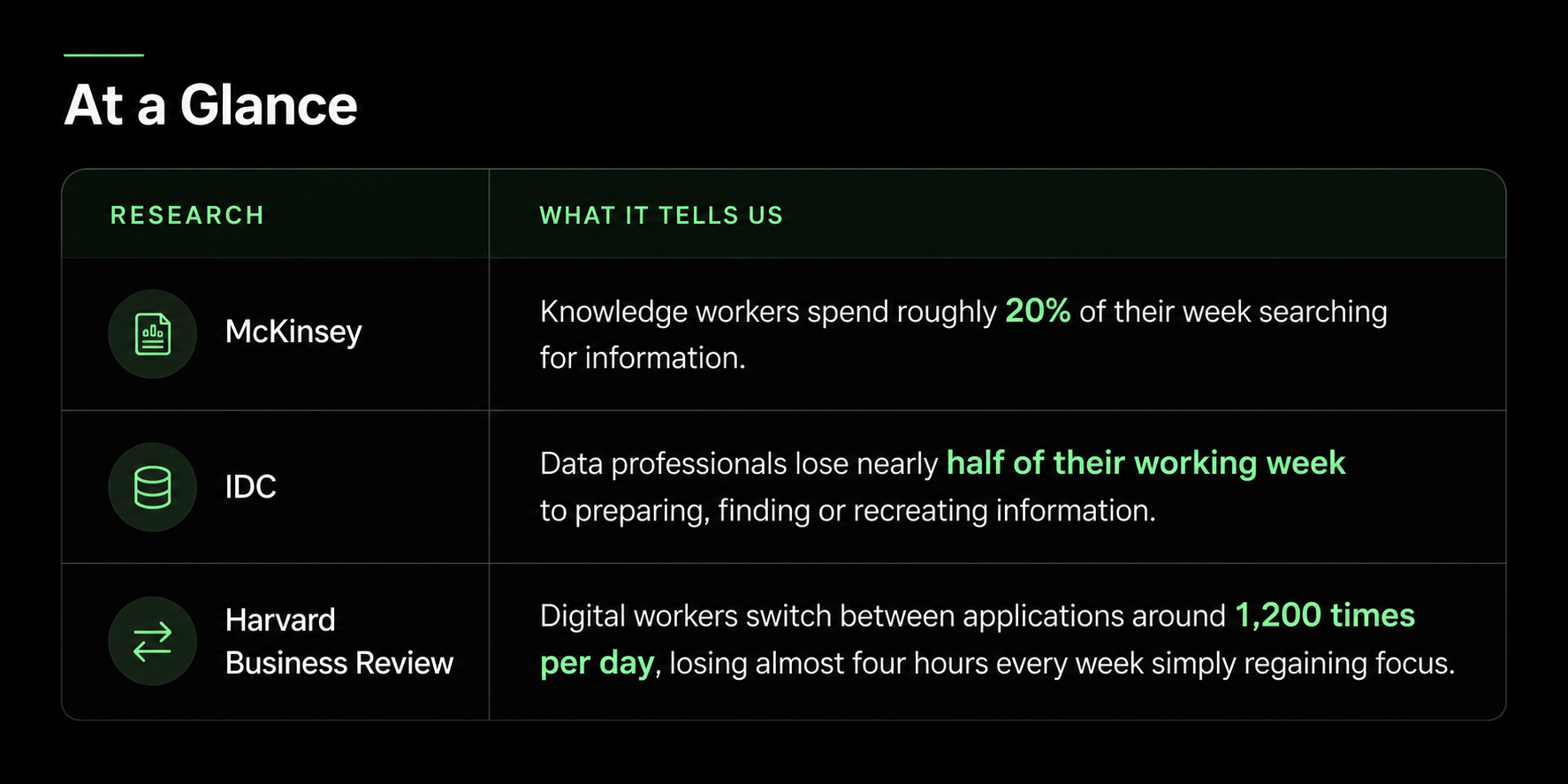
20% of a knowledge worker's week is spent searching for and gathering information. - McKinsey Global Institute
Think about a senior account manager.
Their expertise lies in building relationships, solving customer problems and growing revenue.
Yet much of their day may involve:
- Updating CRM records
- Chasing internal approvals
- Rebuilding reports
- Copying data between systems
- Following up on missed tasks
None of these activities create competitive advantage.
They simply keep fragmented systems working together.
The real cost isn't paying senior salaries.
It's paying senior salaries for work software should already be doing.
At a Glance
Executive Insight
Manual work rarely appears as a line item in financial reports.
Instead, it shows up as slower execution, delayed decisions, duplicated effort and missed opportunities.
Hiring More People Doesn't Fix the Problem
When teams become overwhelmed, the instinct is often to hire.
It feels logical.
More people should mean more capacity.
But operational bottlenecks usually aren't caused by a lack of people.
They're caused by fragmented workflows.
Deloitte's Global Intelligent Automation research has consistently identified process fragmentation as one of the biggest barriers to automation at scale.
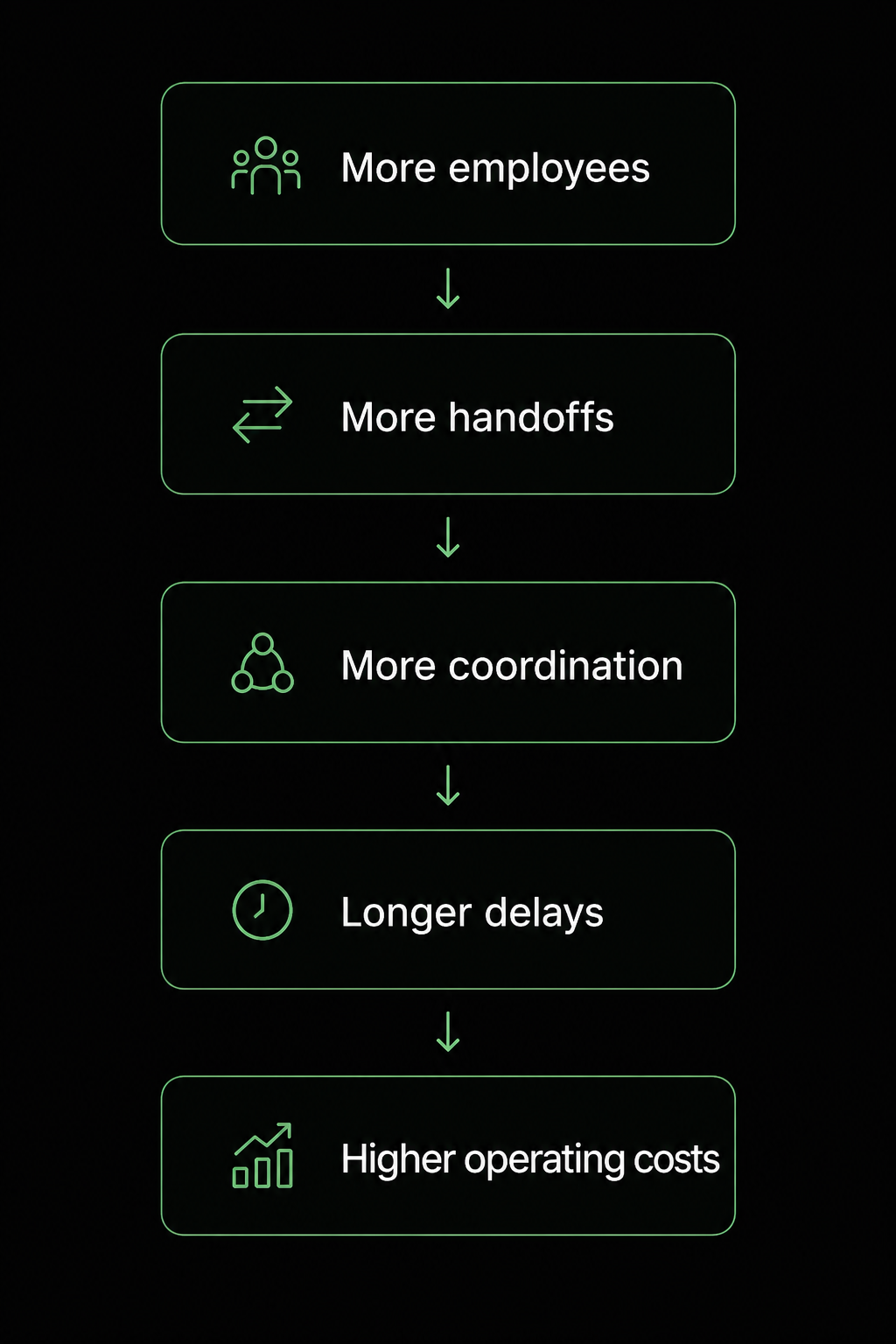
Every additional handoff creates another opportunity for delays, errors, and duplicated work.
Instead of reducing friction, more people often increase coordination.
What Happens When Processes Fragment?
Adding people scales capacity.
Removing unnecessary handoffs scales efficiency.
Those are very different outcomes.
Bottom Line
Hiring increases output.
Workflow automation removes friction.
Businesses that scale efficiently focus on removing unnecessary work before adding more people.
Your Customers Feel It Before You Do
Internal delays rarely stay internal.
Eventually they reach your customers.
Consider a typical sales enquiry.
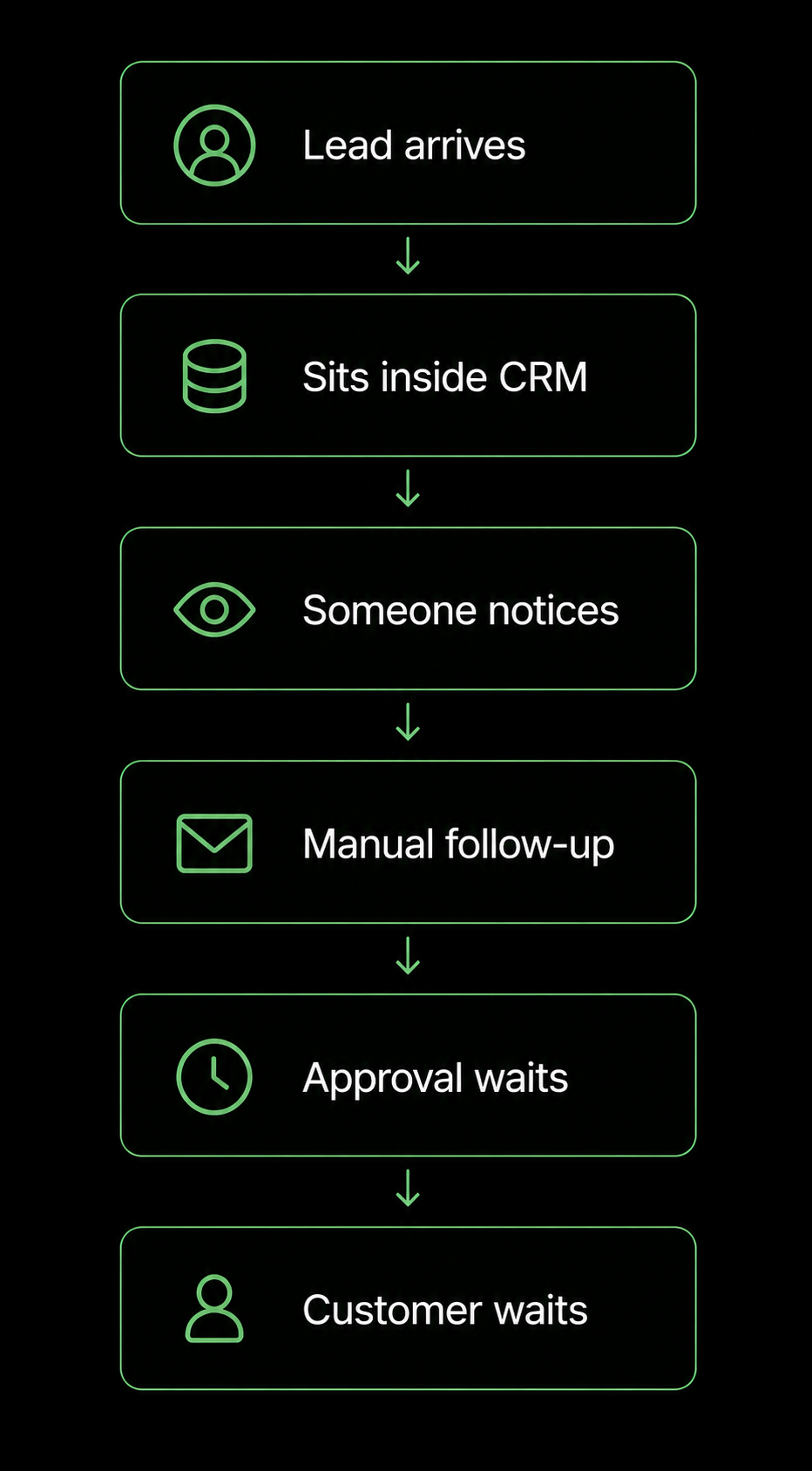
Harvard Business Review found that companies responding within an hour are dramatically more likely to qualify leads than organisations that wait longer.
Most of those delays aren't caused by poor salespeople.
They're caused by work waiting inside disconnected systems.
Customers experience slow response times long before leadership notices declining productivity metrics.
Executive Insight
Every manual handoff introduces waiting time.
Customers experience that waiting as poor service.
Which Business Processes Should You Automate First?
One of the biggest mistakes organisations make is trying to automate everything.
Successful automation starts with the right workflows.
Look for processes that meet these four criteria.
1. High Frequency
Tasks performed every day create the fastest return on investment.
Daily work compounds.
Quarterly work doesn't.
2. Rules-Based
If everyone follows the same decision logic, automation becomes reliable.
If every employee performs the task differently, standardise it first.
3. Cross-System
The biggest opportunities exist where work moves between systems.
Examples include:
- CRM → ERP
- Email → CRM
- ERP → Finance
- Ticketing → Reporting
Every system boundary introduces opportunities for duplicate entry and lost context.
4. Measurable
Choose processes with clear metrics such as:
- Time to respond
- Time to approve
- Time to invoice
- Time to close
Without a baseline, success cannot be measured.
Automation Priority Matrix
Executive Insight
The best automation opportunities aren't usually the most complicated.
They're the most repetitive.
How Leaders Find High-Value Automation Opportunities
Instead of asking teams,
"What's frustrating?"
Ask better questions.
Where Does Work Wait? Don't measure effort. Measure waiting.
A task taking four minutes but sitting in a queue for sixteen hours represents a much bigger opportunity than a genuinely complex piece of analysis.
What Gets Entered Twice? Duplicate data entry is often the clearest sign that two systems aren't communicating.
Every duplicated field represents avoidable effort.
Who Spends Their Day Chasing? Reminder emails. Status requests. Approval follow-ups.
These activities create almost no business value.
They simply compensate for disconnected workflows.
Executive Insight
The loudest complaints aren't always the most expensive problems.
Follow delays.
Not frustration.
What Efficient Operations Actually Look Like
When workflows are connected properly, the experience changes completely.
Employees spend less time coordinating work.
They spend more time creating value.
The Lektik Approach
Technology alone doesn't solve operational complexity.
Workflow design does.
At Lektik, we begin by understanding how work actually moves through your organisation-not how it's documented.
Step 1 - Map the Workflow
Identify every system, decision point and handoff.
Step 2 - Remove Unnecessary Friction
Simplify workflows before introducing automation.
Step 3 - Connect Existing Systems
Integrate the tools your teams already use rather than replacing them unnecessarily.
Step 4 - Automate Repetitive Operations
Deploy intelligent workflows that eliminate manual coordination while keeping people focused on decisions that require experience and judgement.
"Most businesses don't have an automation problem. They have a workflow design problem."
Final Thought
Every manual handoff introduces another opportunity for delay.
Every disconnected system creates another place where work can stop.
The organisations gaining an operational advantage today aren't simply hiring more people or buying more software.
They're redesigning how work moves.
By removing repetitive coordination and connecting the systems they already own, they enable their teams to focus on customers, decisions and growth-not administration.
That's the foundation of scalable operations.
And that's where Lektik helps businesses create lasting operational advantage.
Frequently Asked Questions
What is workflow automation?
Workflow automation connects business systems-such as CRM, ERP, email and ticketing platforms-so information flows automatically without repetitive manual work.
How much time do employees lose to manual work?
Research from McKinsey suggests knowledge workers spend around 20% of their working week searching for and gathering information, while Harvard Business Review reports several additional hours lost every week due to constant application switching.
What delivers the best ROI from automation?
The highest returns typically come from automating high-frequency, rules-based processes that move information between multiple systems, such as approvals, CRM updates, lead routing and reporting.
Should businesses optimise processes before automating them?
Yes. Automating an inefficient process simply accelerates inefficiency. Process improvement and automation should happen together.
How can leaders identify automation opportunities?
Start by looking for workflows where work waits, information is entered multiple times, or employees spend significant time chasing updates and approvals.
These are often the highest-value opportunities for automation.
Does automation replace employees?
In most cases, no.
Automation removes repetitive administrative work so employees can spend more time on customer relationships, strategic thinking and high-value decision-making-the work they were hired to do.