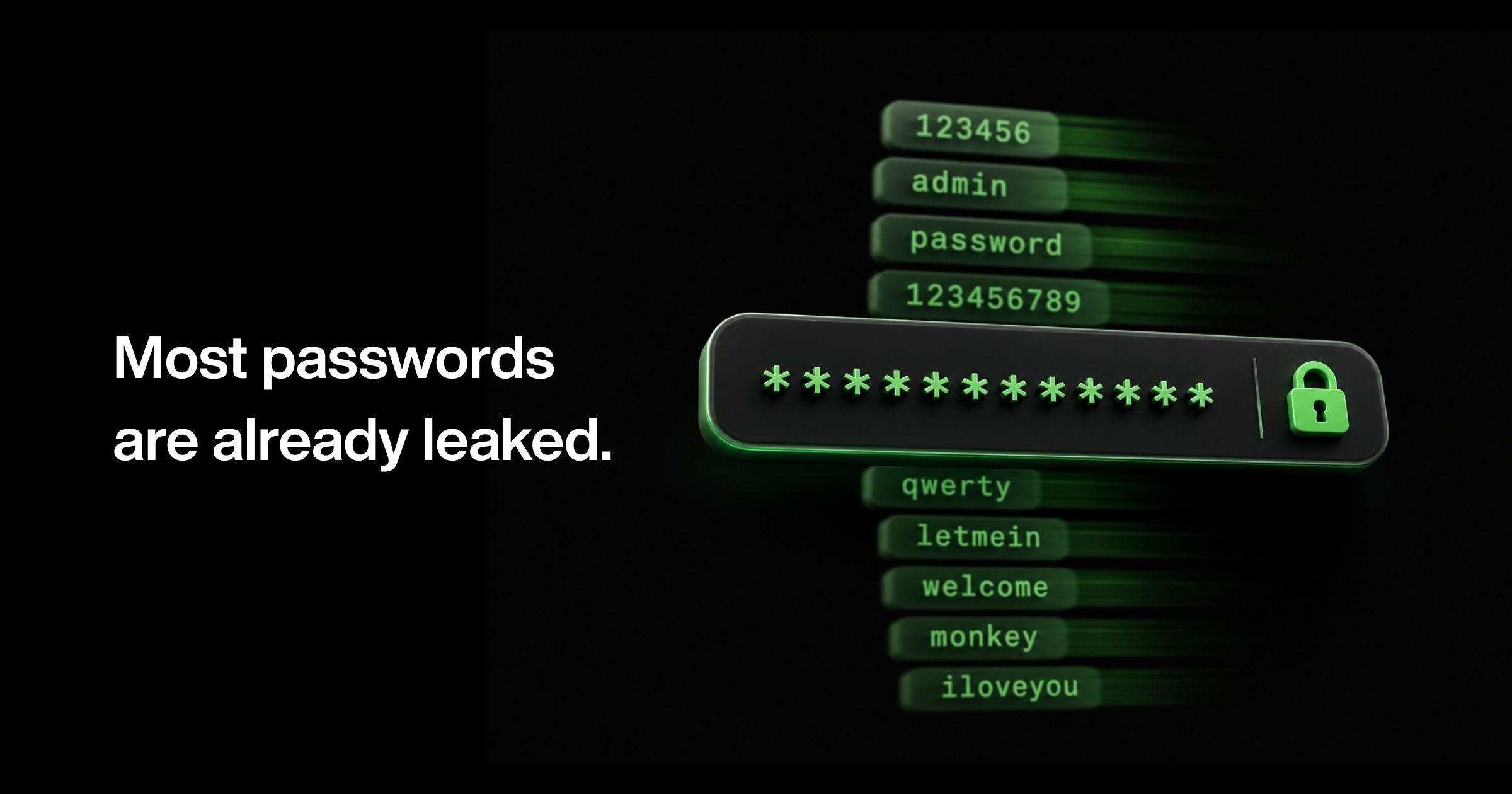
World Password Day 2026 falls on May 7. It’s a useful annual checkpoint, because the data on how people are securing their accounts in 2025–2026 is sobering: 81% of data breaches are linked to weak or reused passwords. The most-used password on the internet is still “123456” — with over 21 million confirmed uses in leaked datasets, according to NordPass’s 2025 study.
In June 2025, a single dataset surfaced online containing 16 billion stolen credentials — a compilation drawn from roughly 30 recent leaks. Verizon reports the average price of a stolen credential on criminal markets is now $10, and some criminal groups sell subscription packages: a steady stream of fresh stolen passwords for $81 a week.
This guide is what we wish more people read before May 7 each year. It covers what makes a password strong in 2026, which passwords are most commonly leaked (and therefore most dangerous to use), how to keep personal information out of your credentials, how to check whether your data is already exposed, and what businesses should be thinking about beyond the password itself.
What this guide covers
- The most common leaked passwords in 2025–2026 (and why even the “complex” ones are unsafe)
- Predictable password patterns attackers expect
- How to create a strong password: the 2026 rules
- Why personal details don’t belong in passwords or security questions
- How to check if your passwords have been leaked
- Password security for businesses: what comes after the login
- Frequently asked questions
Don’t Use These Most Common Leaked Passwords in 2026
Each year, NordPass and NordStellar publish the world’s most common passwords by analyzing leaked password databases and dark web repositories. The 2025 study analyzed leaks from September 2024 to September 2025. If your password is on this list, or a close variation of it, attackers have already seen it. Change it before you finish reading this section.
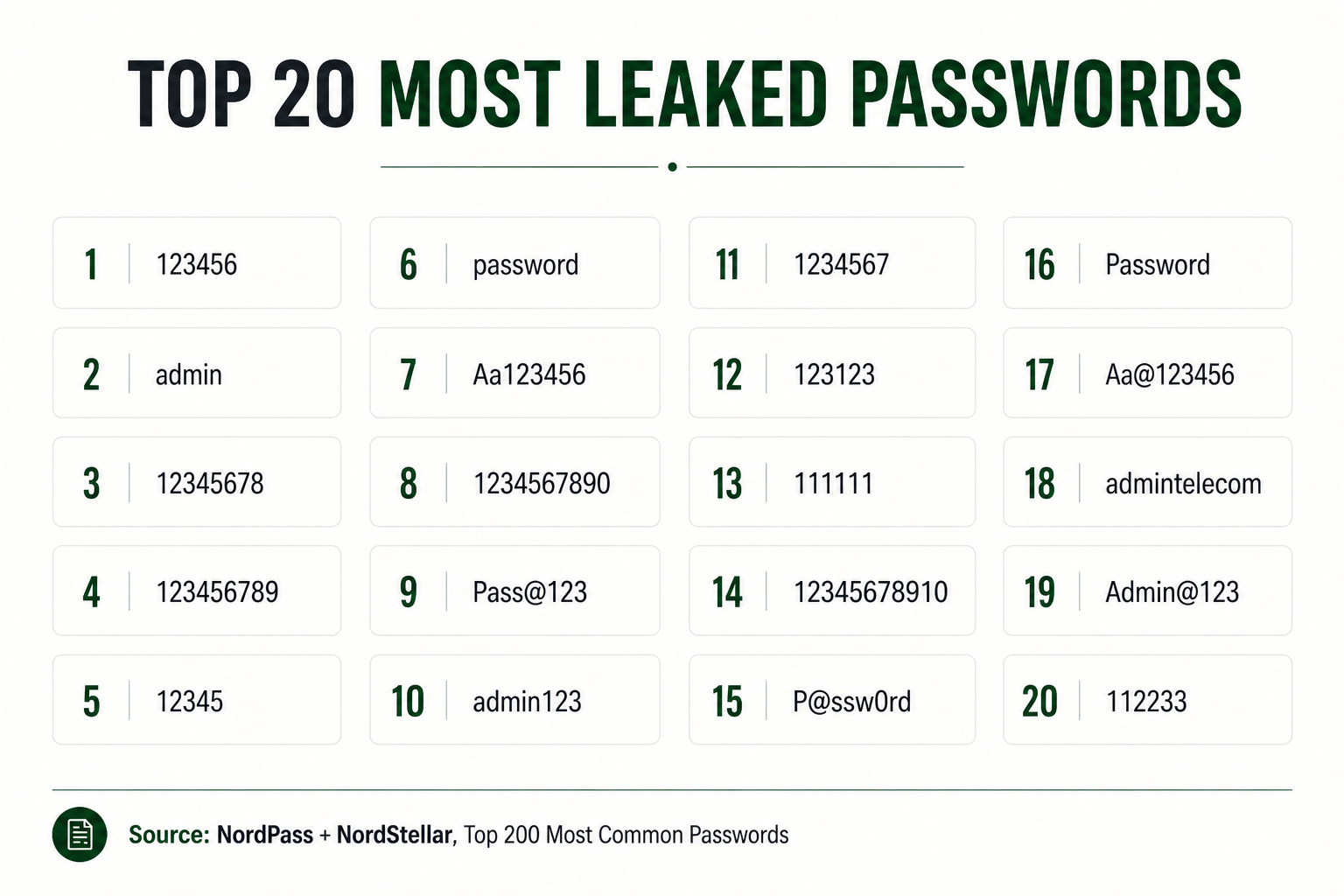
Notice the trap. The “complex-looking” passwords on this list - Pass@123, P@ssw0rd, Aa@123456, Admin@123 - follow the exact substitution rules attackers expect: capitalize the first letter, swap ‘a’ for ‘@’, append ‘123’. Modern cracking software runs through these patterns in milliseconds. Looking complex isn’t the same as being complex.
Predictable Password Patterns Attackers Already Know
Attackers don’t guess one password at a time. They run dictionaries of millions of candidates with every common substitution and pattern automated. Modern GPUs can test up to 180 billion password combinations per second. Here’s what they expect to find, and what you should never use as the basis for a password:
- Sequential numbers or letters: 123456, qwerty, abcdef, 1q2w3e4r. Cracked in under a second.
- Dictionary words: password, monkey, sunshine, dragon, princess, iloveyou, even with a number tacked on the end.
- Personal information: your name, birthday, partner’s name, child’s name, pet’s name, hometown, favourite team. All available on your social media.
- Pop culture references: taylorswift, pokemon, starwars, batman. Targeted dictionaries cover these too.
- Predictable substitutions: swapping ‘a’ for ‘@’, ‘o’ for ‘0’, ‘s’ for ‘$’. Cracking tools have automated this since 2005.
- Default passwords: admin, welcome, newuser, temppass. Especially common in business accounts, and especially dangerous.
How to Create a Strong Password in 2026: The 6 Rules
The rules for a strong password in 2026 are simpler than they used to be. Updated NIST guidance has dropped the old advice about forcing symbols and frequent password rotations, because that advice was making passwords weaker in practice, not stronger. Here’s what matters now.
1. Length over complexity
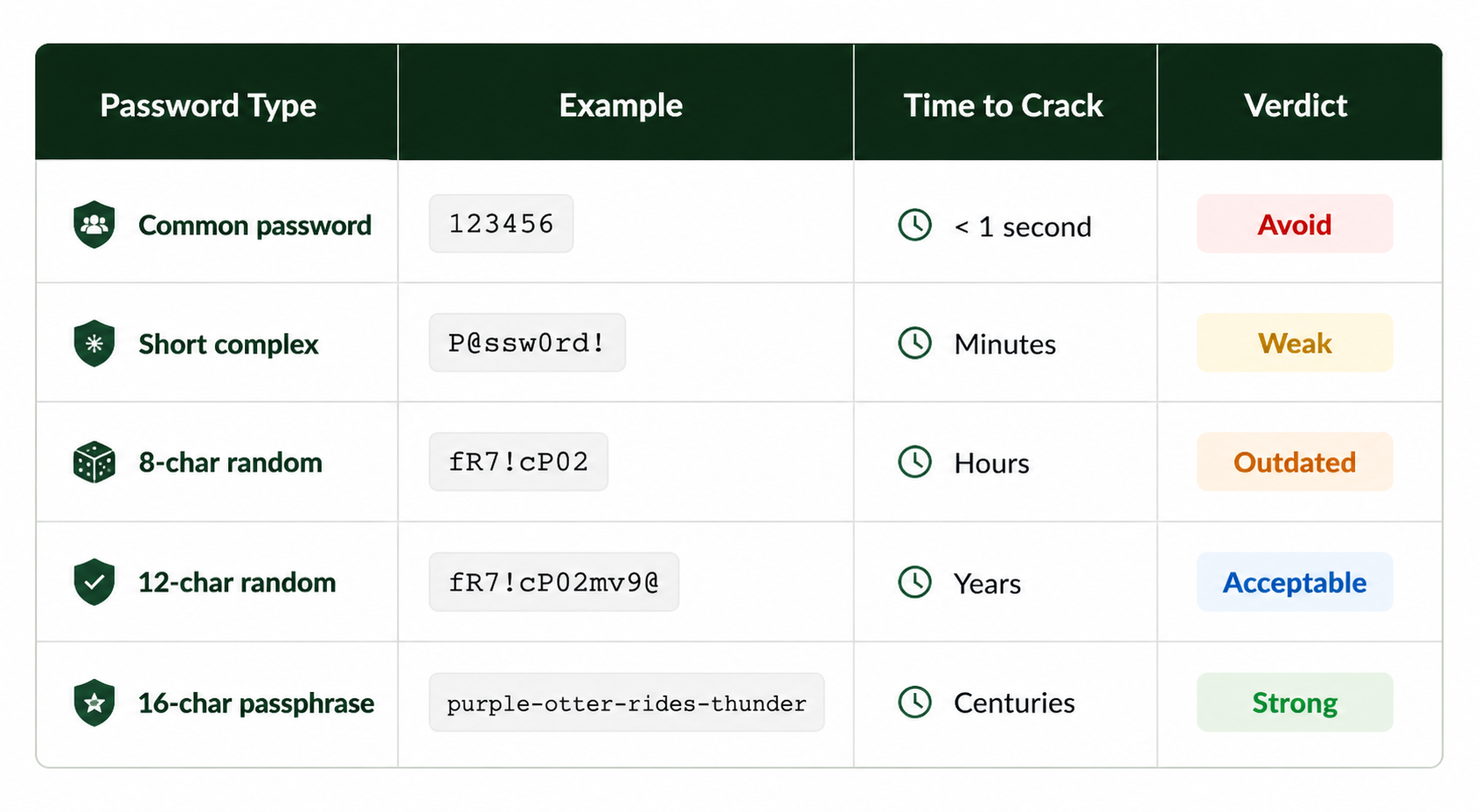
A 16-character passphrase beats a tortured 8-character password with three symbols every time. Aim for at least 14–16 characters as a baseline, longer for sensitive accounts.
2. Use a passphrase, not a word
Four to six random, unrelated words strung together, like purple-otter-rides-thunder, are dramatically harder to crack than P@ssw0rd99 and far easier to remember. The key word is "unrelated": don’t pick lyrics, idioms, or famous quotes. Attackers have dictionaries of those too.
3. Make every password unique
Reused passwords are how one leaked credential becomes ten compromised accounts. Credential stuffing, where attackers test stolen username/password pairs across hundreds of sites, is one of the cheapest, most successful attack methods in existence. The average internet user has over 100 personal accounts and 87 work accounts. None of them should share a password.
4. Use a password manager
You cannot remember a hundred unique 16-character passphrases. You’re not supposed to. A password manager generates and stores them, autofills them on legitimate sites, and warns you about reused or breached credentials. Reputable options include 1Password, Bitwarden, NordPass, Dashlane, and the built-in managers in Apple Passwords and Google Password Manager. Even a free one is better than none.
5. Turn on multi-factor authentication everywhere
Even a leaked password becomes useless if the attacker also needs your phone or hardware key. MFA is the single highest-leverage security move available to you. Authenticator apps (Google Authenticator, Microsoft Authenticator, Authy) are stronger than SMS codes, and hardware keys like YubiKey are stronger still. Prioritise enabling MFA on email, banking, and cloud storage — the accounts that can reset all your other accounts.
6. Switch to passkeys when offered
Passkeys remove the password from the equation entirely, using cryptographic keys tied to your device, unlocked with biometrics. Google, Apple, Microsoft, and a growing list of platforms now support them. They’re phishing-resistant by design and faster to use than passwords. Use them wherever they’re available; passwords still cover the rest.
Keep Personal Details Out of Passwords and Security Questions
One of the most overlooked failure modes in password security: people use personal details: birthdays, anniversaries, kids’ names, hometowns as the basis for both their passwords and their security question answers. The same details they’ve already published on Instagram, LinkedIn, or in a Facebook “fun fact” post.
Treat your security questions like passwords. The honest answer to “What’s your mother’s maiden name?” is in a public records search. Use a password manager to generate and store random fake answers. The recovery flow doesn’t care if your mother’s “maiden name” is actually a 20-character random string; it just needs to match what you stored.
A simple privacy rule of thumb: if a fact about you appears anywhere on the internet, social media, professional bios, public records, or even a quiz you took for fun, it cannot be the basis of a password or a security answer.
How to Check If Your Passwords Have Been Leaked
With 16 billion credentials sitting in compilation leaks and 2.8 billion sold on criminal forums in 2024 alone, the question isn’t whether your data has ever been exposed. It’s which accounts and how recently.
- Run your email through Have I Been Pwned. haveibeenpwned.com is a free service maintained by security researcher Troy Hunt that tells you which breaches your address has appeared in.
- Check passwords directly. Most reputable password managers automatically flag passwords that have shown up in known leaks. Turn this feature on.
- Set up breach alerts. Have I Been Pwned and most password managers will email you if your address appears in a future leak.
- Audit quarterly, not annually. New breaches surface constantly. World Password Day is a good prompt, but four times a year is better.
If a password is flagged as breached, change it everywhere it’s ever been used — not just on the breached site. That’s the entire reason credential stuffing works.
Password Security for Businesses: What Comes After the Login
Everything above is about personal hygiene. If you’re running a business, the conversation gets harder, because even if every employee did everything right, your real exposure lives elsewhere. In your applications, your APIs, your release pipelines, your mobile apps. The places attackers go once a stolen credential gets them through the door.
This is where the work Lektik does sits. Two of our cybersecurity ventures address the gap between password-level hygiene and business-level resilience:
NetNex (a Lektik venture) runs attacker-style penetration tests in weeks rather than months, with readable reports tied to real business risk and validation retesting that proves what’s been fixed. It exists because too much enterprise security has been slow, jargon-heavy, and disconnected from what teams need to act on.
Quokka (a leader in mobile application security) came to us with a scale problem. We co-built a fully automated vulnerability assessment framework integrated directly into CI/CD pipelines, cutting manual effort by 90% and catching vulnerabilities at the speed software ships.
Both are answers to the same underlying question: What does cybersecurity look like when it operates at the speed and scale of modern business, instead of asking modern business to slow down for it?
Frequently Asked Questions
What is the most common password in 2026?
According to NordPass’s 2025 research analysing leaks from September 2024 to September 2025, the most common password in the world remains “123456”, with over 21 million confirmed uses. “admin” is second, also with over 21 million uses, followed by “12345678”, “123456789”, and “12345”.
How long should a strong password be in 2026?
A strong password should be at least 14–16 characters long. Length matters more than complexity — a 16-character passphrase made of unrelated words is significantly harder to crack than an 8-character password with symbols and numbers. For high-sensitivity accounts (email, banking, cloud storage), aim for 20+ characters.
Are passkeys safer than passwords?
Yes. Passkeys use cryptographic keys stored on your device, unlocked with biometrics, and cannot be stolen by phishing or guessed by brute force. They are designed to be phishing-resistant. Use them wherever they’re offered, Google, Apple, Microsoft, and a growing list of services support them, but keep strong passwords for accounts that don’t yet support passkeys.
Is a password manager safe to use?
Yes, reputable password managers use strong encryption and zero-knowledge architectures, meaning even the provider cannot see your passwords. The risk of a manager being breached is dramatically lower than the risk of password reuse, which is the alternative for most people. Always protect your master password with a strong passphrase and multi-factor authentication.
Should I change my password every 90 days?
No. Updated NIST guidance no longer recommends scheduled password rotation. Forcing changes encourages weaker, more predictable passwords (e.g. “Password2026” → “Password2027”). Only change a password when there’s reason to suspect it’s been compromised, like a breach notification, a phishing incident, or a flag from your password manager.
What is World Password Day?
World Password Day is observed annually on the first Thursday of May. In 2026, it falls on May 7. Created in 2013, it’s an awareness day for password hygiene and broader credential security, a yearly reminder to audit your passwords, enable multi-factor authentication, and check whether your credentials have been exposed in a data breach.
How can I tell if my password has been leaked?
Use Have I Been Pwned (haveibeenpwned.com), a free service that lets you enter your email address and see which known breaches it appears in. Most reputable password managers also automatically flag stored passwords that have appeared in known leaks. Check quarterly.
World Password Day 2026 is May 7.
Spend ten minutes auditing your passwords using the steps above. Spend the next ten minutes thinking about everything that happens after the login, because for most modern businesses, that’s where the real security work begins.
Building something in cybersecurity, or wish someone would? That’s exactly what our studio exists for.
Sources & further reading
• NordPass + NordStellar, Top 200 Most Common Passwords 2025: nordpass.com/most-common-passwords-list
• Verizon Data Breach Investigations Report 2025
• NIST SP 800-63B Digital Identity Guidelines (updated 2025)
• Have I Been Pwned, haveibeenpwned.com
• CISA Secure Our World password guidance — cisa.gov/secure-our-world